



This Dell XPS 16 review covers key specifications and pricing, design and build quality: thinner, lighter and more refined and display: gorgeous oled worth the upgrade. It brings the relevant details and limitations together so you can compare the options discussed in the article.
Dell has revived the XPS 16 after briefly killing off the brand, and the 2026 model is a thinner, lighter, and more refined version of the 16 Premium. The XPS 16 is a well rounded laptop with a good balance between power and portability. However, the price is steep for a system without discrete graphics. The tested configuration costs 2,350 US dollars, which puts it squarely against laptops with dedicated Nvidia RTX graphics. The XPS 16 is a good fit for shoppers looking for a do it all big screen laptop that offers a roomy 16 inch OLED display inside a fairly trim package, backed by solid but not groundbreaking performance. It lacks the additional power you would get from a laptop with a dedicated GPU, but it is thinner, lighter, and quieter than those alternatives.
Table of Contents
Key Specifications And Pricing
The XPS 16 is powered by Intel‘s Panther Lake processors and uses integrated Intel Arc graphics only. There is no option for a discrete GPU.
| Feature | Specification |
|---|---|
| Processor | Intel Core Ultra X7 358H (16 cores) |
| Graphics | Intel Arc B390 iGPU (12 Xe3 cores) |
| RAM | 32GB LPDDR5X (up to 64GB) |
| Storage | 1TB SSD (Kioxia BG7, up to 4TB) |
| Display | 16 inch 3.2K OLED, 3,200 x 2,000 pixels, 120Hz VRR, touch |
| Ports | 3x Thunderbolt 4 USB C, headphone jack |
| Weight | 3.65 to 3.8 pounds (1.65 to 1.72 kg) |
| Dimensions | 13.88 x 9.35 x 0.58 inches |
| Starting Price | 1,749 USD |
| Price as Tested | 2,350 USD |
| Top Configuration | Up to 3,550 USD |
Design And Build Quality: Thinner, Lighter And More Refined
The XPS 16 is a trimmed down version of the 16 Premium, but it keeps many of the design elements, including a latticeless keyboard and a huge, haptic touchpad. The most welcome change is that Dell replaced the touch sensitive icons in the Function row with normal, physical keys that are easier to use and provide tactile feedback. The touchpad is enormous and provides lively, customizable haptic feedback for clicks. Dell has added subtle etched borders on its sides so you know where its active surface ends. The aluminum chassis feels extremely premium, with precise edges and a nearly borderless display. The XPS 16 weighs 3.65 to 3.8 pounds, making it nearly 1.5 pounds lighter than the tank like 16 Premium. It is also almost a pound lighter than the 4.7 pound MacBook Pro 16.
The seams that run along the edges of the keyboard deck and the bottom of the keyboard are debris magnets and can collect crumbs, dirt and other material. The port selection is also very limited. You get only three Thunderbolt 4 ports along with a headphone jack. There is no SD card slot, and no USB Type A ports. An adapter is not included in the box. Upgrade options are also limited. The RAM is soldered and cannot be upgraded, and there is no second M.2 slot. To increase storage, you must replace the laptop‘s SSD entirely, which is a much trickier operation.
Display: Gorgeous OLED Worth The Upgrade

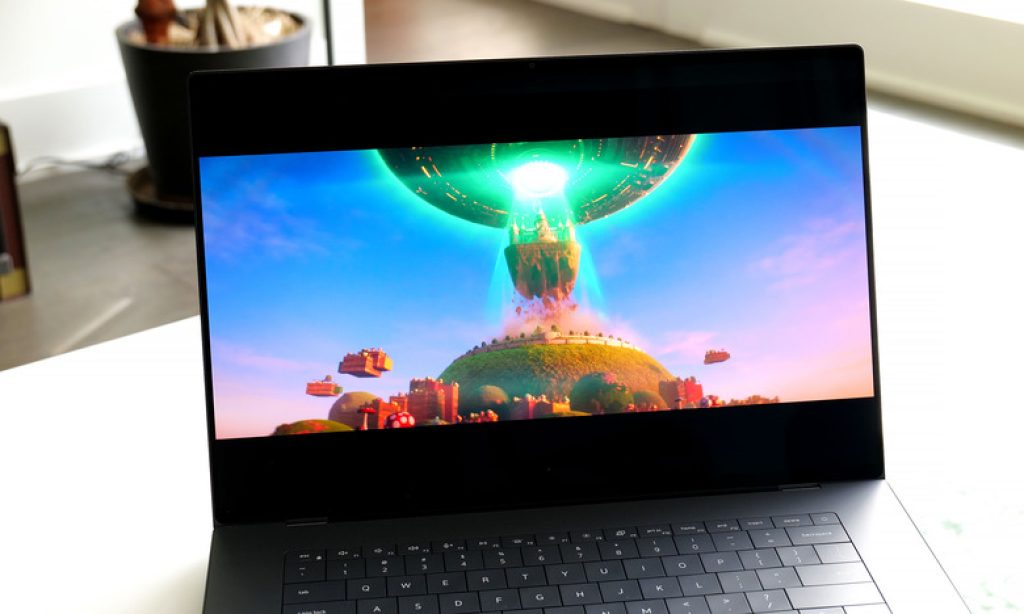
The baseline display for the XPS 16 is a basic 1,920 by 1,200 pixel non touch IPS LCD. The 3.2K OLED upgrade adds only 150 US dollars to the cost, and it is money well spent for the higher resolution and better contrast alone. You also get touch support and a variable refresh rate up to a smooth 120Hz. On tests with a colorimeter, the OLED panel covered 100 percent of the sRGB and P3 gamuts and 97 percent of the larger AdobeRGB color space. It also achieved a peak brightness of 414 nits, which, combined with the OLED panel‘s near zero black levels, creates a beautifully dynamic picture with bright whites, deep blacks and rich, vivid colors. The display is easily bright enough for indoor use and looks great from any angle.
Performance: Strong Integrated Graphics, But No Discrete GPU Option
The XPS 16 test system is based on an Intel Core Ultra X7 358H processor that features 16 cores, made up of four performance cores, eight efficient cores and four low power efficient cores. It comes with Intel‘s integrated Arc B390 GPU that delivers 12 Xe3 cores. The XPS 16 turned in competitive multi core and single core scores in productivity benchmarks. For gaming, it delivered 1080p frame rates of 76 frames per second on Guardians of the Galaxy and 73 fps on Shadow of the Tomb Raider. Those are impressive numbers for a laptop this thin, and it runs quietly even under load.
The XPS 16 is a fantastic laptop for productivity tasks, content creation, and light gaming. However, there is no option for a discrete GPU. If your work requires Nvidia RTX level graphics for 3D rendering or heavy video effects, you need to look elsewhere. The trade off is that by sticking with integrated graphics, Dell is able to make the XPS 16 thinner and lighter and also run more coolly and quietly than laptops with dedicated GPUs.
Latticeless Keyboard And Massive Haptic Touchpad
The latticeless keyboard lacks traditional spacing between keys, which initially raises concerns about typos and frustration. However, those fears are unfounded. The keys offer a shallow but springy response that allows for fast and accurate typing. The rigid, all aluminum frame also aids the typing experience, with no flex underneath the palms. The touchpad is enormous and provides lively, customizable haptic feedback for clicks. Dell has added subtle etched borders on its sides so you know where its active surface ends. Early reports of keyboard issues on some units have surfaced, but the CNET review unit did not exhibit any problems. The physical function row keys are a major improvement over the touch sensitive icons of the 16 Premium.
Audio And Webcam: Top Notch
The quad speakers located below the display produce richer, more detailed sound than the average laptop. The 8 megapixel webcam produces crisp, detailed 4K photos and 1440p video. The webcam is an IR camera, which means you can use it for Windows Hello facial recognition logins. This is important because the XPS 16 lacks a fingerprint reader. The speakers and webcam are both top notch, making the XPS 16 excellent for video conferencing and media consumption.
Battery Life: Solid 14 Hours
The XPS 16 lasted 14 hours in the YouTube streaming battery drain test. This is not as impressive as the 20 plus hours of Apple’s latest MacBook Pros, but it should get you through most days on a single charge. It is also significantly better than many other large screen, high powered Windows laptops, which often struggle to reach 10 hours. The XPS 16 runs longer than the typical big screen laptop, striking a good balance between performance and battery longevity.
XPS 16 Vs The Competition
The XPS 16 sits in a unique middle ground. It is more portable than the Asus ProArt P16 and Lenovo Yoga Pro 9i, both of which offer better graphics performance but are heavier and run hotter. It is more powerful than the ultraportable Asus Zenbook A16, which is lighter (2.9 pounds) but also less capable. The Apple MacBook Pro 16 offers longer battery life (over 20 hours) and significantly faster graphics performance, but it is also heavier and more expensive. The XPS 16 is a good choice for users who want a premium 16 inch laptop with a beautiful OLED display and solid all around performance, and who do not need a discrete GPU.
| Aspect | Dell XPS 16 | Asus ProArt P16 | MacBook Pro 16 | Asus Zenbook A16 |
|---|---|---|---|---|
| Processor | Core Ultra X7 358H | AMD Ryzen AI 9 HX 370 | Apple M5 | Core Ultra (low power) |
| Graphics | Intel Arc B390 (iGPU) | Nvidia RTX (dGPU) | Apple M5 integrated | Intel integrated |
| Weight | 3.65 lbs | Around 4.5 lbs | 4.7 lbs | 2.9 lbs |
| Battery Life | 14 hours | Around 10 hours | 20+ hours | Around 12 hours |
| Best For | Balanced portable work | Graphics intensive tasks | Creatives needing long battery | Maximum portability |
Pros And Cons Of The Dell XPS 16
Pros
- The physical keys in the Function row are a major improvement over the touch sensitive icons.
- The 16 inch 3.2K OLED display is a standout upgrade option that delivers accurate color and deep black levels.
- The latticeless keyboard is surprisingly comfortable and accurate for fast typing.
- The huge haptic touchpad is customizable and provides satisfying feedback.
- The quad speakers produce rich, detailed sound, and the 8 megapixel webcam is crisp.
- The laptop is very quiet even under load, with minimal fan noise.
- At 3.65 pounds, it is significantly lighter than the 16 Premium and the MacBook Pro 16.
- The 14 hour battery life is solid for a laptop with a large OLED panel.
Cons
- The price is high for a laptop without discrete graphics, starting at 1,749 USD and reaching over 3,500 USD.
- The seams along the edges of the keyboard are debris magnets that can collect crumbs and dirt.
- The port selection is limited to three Thunderbolt 4 ports and a headphone jack, with no SD card slot.
- The RAM is soldered and cannot be upgraded, and there is only one M.2 slot for storage.
- The base model has a lackluster IPS display; the OLED upgrade adds cost.
- No fingerprint reader is included, though there is an IR camera for Windows Hello.
- No discrete GPU option is available, which limits its appeal for demanding graphics work.
- The chassis, while premium, still has seams that trap debris, unlike Apple‘s truly seamless unibody design.
- The keyboard has been inconsistent in early reviews, with some units having issues.
- An adapter is not included in the box, so you must provide your own for legacy USB devices.
Frequently Asked Questions (FAQs)
Is the Dell XPS 16 good for gaming?
The XPS 16 is capable of light 1080p gaming, delivering around 70 to 76 frames per second in titles like Guardians of the Galaxy and Shadow of the Tomb Raider. However, it lacks a discrete Nvidia RTX GPU, so it is not suited for modern triple A titles at high settings or 1440p and 4K gaming.
Does the Dell XPS 16 have a dedicated GPU?
No. The XPS 16 uses integrated Intel Arc B390 graphics only. There is no option to upgrade to a discrete GPU from Nvidia or AMD.
Related Reading on TopDealAccess
Check current information: Dell official information. Availability, terms and product details should be confirmed for the exact version discussed.