



This Brick Phone Magnet review covers customization and features, physical design and brick vs bloom card vs unpluq tag. It brings the relevant details and limitations together so you can compare the options discussed in the article.
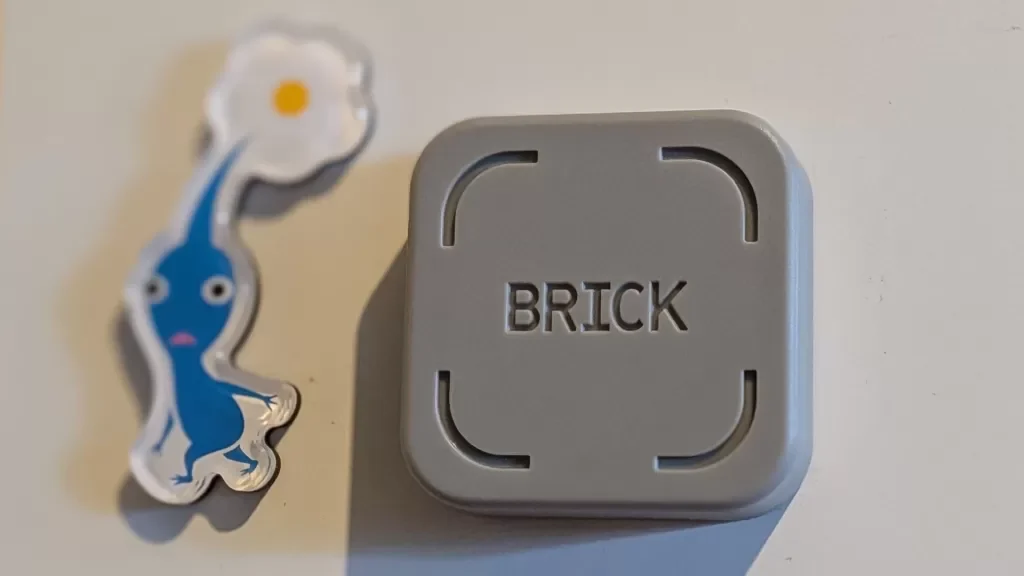
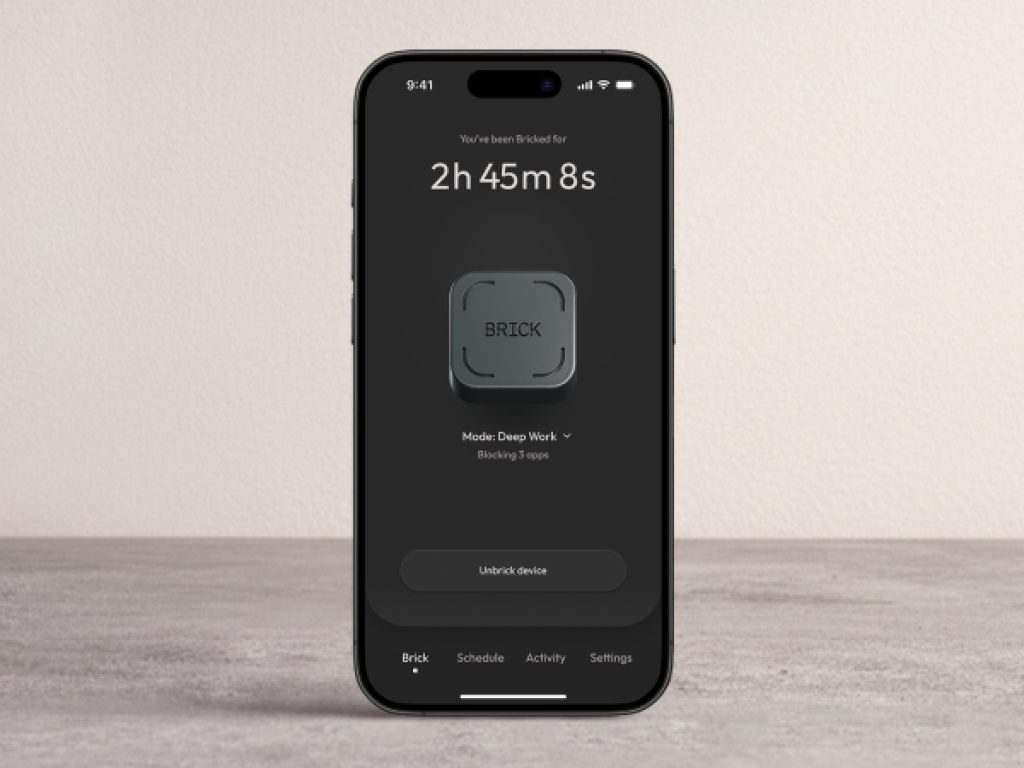
The Brick is a physical NFC powered magnet designed to help users reduce screen time and stop doomscrolling. It costs 59 USD and requires no battery or subscription. The Brick communicates with your phone via NFC when you tap the device against it. This activates or deactivates a lock on selected apps and websites. The Brick app allows you to create up to 10 modes (work, study, family dinner) and block specific apps. Physical tapping is required to enable or disable the lock, adding friction that screen time alerts lack. The reviewer spent 35 hours total with their phone bricked and noted a significant reduction in social media use. The Brick is HSA and FSA eligible with a 30 day money back guarantee. This review covers the setup process, features, customization options and how it compares to Bloom Card, Blok Card and Unpluq Tag.
Table of Contents
Brick Phone Magnet: How The Brick Works
The Brick is a palm sized square magnet powered by an embedded NFC chip. It draws power directly from your phone‘s NFC reader when you tap the device. No batteries or external power source is needed.
Setup steps:
- Download the Brick app (iOS or Android).
- Grant the app access to your phone‘s screen time tracker.
- Create a mode (name it, select apps and websites to block or allow).
- Press tap or hold to Brick on the app home screen.
- Physically tap your phone to the Brick.
Unbricking:
- Tap your phone to the Brick again to end the session.
- Or use emergency unbricks (5 total) without the physical Brick.
Customization And Features
The Brick app allows extensive customization.
Modes
- Create up to 10 modes for different occasions (work, studying, family dinner, personal time).
- Each mode has its own list of blocked apps and websites.
Scheduling
- Set a schedule for when modes are enabled.
- Start at a specific time on selected days.
- End at a set time or when you tap the Brick.
Settings (when Brick is active)
- Strict mode: prevents ending a session by deleting the app.
- Block app installs: prevents installing new apps.
- Block in app purchases: limits spending.
- Block mature content: limits mature content across apps and websites.
- Live activities: shows active Brick session timer at the top of the screen.
- Notifications: coaching support, check ins and updates.
Emergency unbricks
- You get 5 emergency unbricks that let you unbrick your phone without the physical Brick.
- Use them wisely.
Physical Design
- Magnetic back: attaches to refrigerators, lockers and metal surfaces.
- Anti slip silicone bottom: keeps it in place on any surface.
- Optional mount (12 USD): adhesive backing to secure the Brick to a wall. Magnetic interior allows the Brick to snap in place.
Brick Vs Bloom Card Vs Unpluq Tag
| Product | Price | Subscription | Form Factor | Magnetic | Emergency Unbricks |
|---|---|---|---|---|---|
| Brick | 59 USD | No | Square magnet | Yes | 5 |
| Bloom Card | 39 USD | No | Wallet card | No | Not specified |
| Blok Card | 49 USD | No | Wallet card | No | Not specified |
| Unpluq Tag | 27 USD | Yes (35 USD/6 months) | Keychain tag | No | Not specified |
| DIY NFC tag | 13 USD for 50 pack | No (app may be free) | Various | No | Not specified |
The Brick is the most expensive upfront but has no subscription and includes magnetic mounting.
Reviewer Experience
The reviewer placed the Brick on their refrigerator. The distance from the couch meant they had to physically get up and walk to tap the Brick to end a session. This added friction helped them reconsider whether they really wanted to scroll.
- Longest Brick session: 6 hours and 45 minutes.
- Total Brick time: 35 hours.
- Modes created: Mindful Mode (blocked TikTok, YouTube and Instagram).
- Result: significant reduction in social media use.
The reviewer notes that screen time limits on iPhones are too easy to disable. The Brick requires physical effort to bypass.
Pros And Cons Of The Brick
Pros
- No battery or subscription required.
- Physical tapping adds real friction to phone use.
- Works with iOS and Android.
- Up to 10 customizable modes.
- Scheduling for automatic sessions.
- Strict mode prevents app deletion bypass.
- 5 emergency unbricks.
- Magnetic back for refrigerator or locker mounting.
- HSA and FSA eligible.
- 30 day money back guarantee.
- Blocks specific apps and websites.
- Can be used with multiple phones.
- One phone can use multiple Bricks.
Cons
- 59 USD is expensive for a magnet.
- Shipping not included.
- Optional mount costs 12 USD extra.
- Emergency unbricks limited to 5 (use wisely).
- Requires iPhone passcode for iOS setup (can be removed after first use).
- Android requires granting notification access.
- Not effective if you leave the Brick at home.
- DIY NFC tags are much cheaper (13 USD for 50).
Frequently Asked Questions (FAQs)
What is the Brick?
A physical NFC powered magnet that blocks selected apps and websites when you tap your phone against it.
How much does the Brick cost?
59 USD. Shipping is extra. An optional mount is 12 USD.
Does the Brick require a subscription?
No. The Brick has a one time cost.
For related coverage, explore Technology on TopDealAccess.