



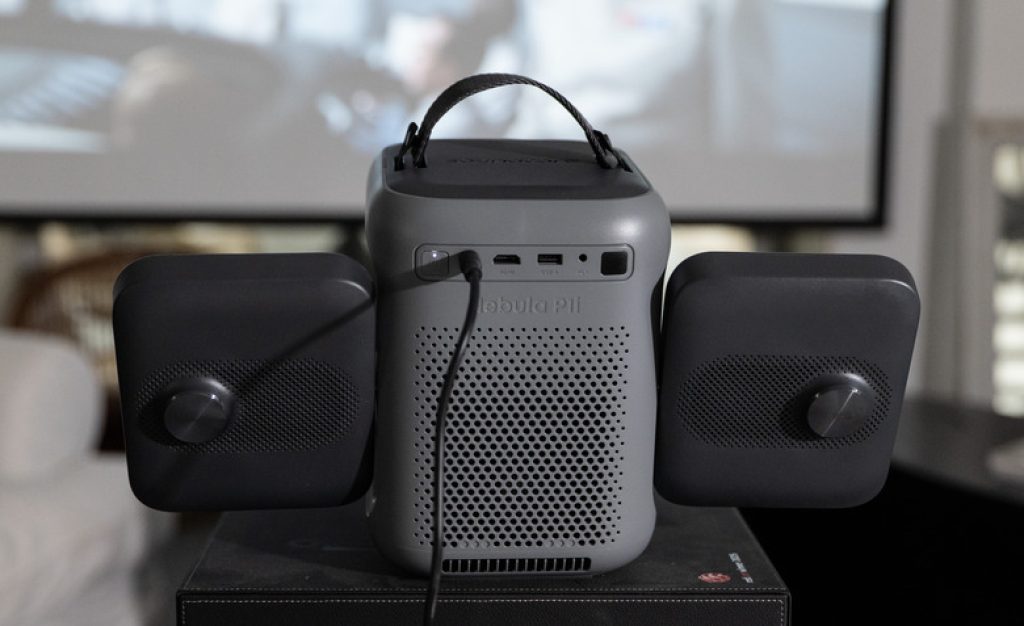
The Soundcore Nebula P1i is a budget projector that stands out thanks to its unique rotating speaker design. The two gray speakers fold out and rotate independently, looking like a pair of elephant ears. Priced under $400, this 1080p projector includes Google TV streaming built in and delivers surprisingly good image quality. While the simple lens lacks upward throw and requires keystone correction, the overall performance makes it a solid choice for movie nights or casual gaming.
Table of Contents
How To Watch And Where To Buy The Soundcore Nebula P1i
The Soundcore Nebula P1i is available online and at select retailers for under $400. It ships with a backlit remote control, a power cable, and a quick start guide.
Rotating Speaker Design: The Elephant Ears
The P1i’s most distinctive feature is its pair of 10 watt speakers that rotate independently. Each speaker folds out 90 degrees and can face forward, backward, or upward. This flexibility allows you to direct sound toward people sitting in different positions around the projector. Many small projectors have speakers that fire in only one direction, leaving some viewers with muffled audio. The P1i solves this problem.
Each speaker has 10 watts of power and can play fairly loud. However, the sound quality is somewhat thin with limited bass. The TCL A1 has fuller sound with better bass, but the P1i is far more versatile in terms of sound direction.
Image Quality And Brightness Performance
The P1i delivers 1080p resolution, a step up from the 720p common on budget projectors just a few years ago. Soundcore claims 380 ANSI lumens, and real world testing measured 382 lumens in the most accurate mode. That is remarkably close to the advertised spec.
In the brighter but less accurate Conference mode, the projector reaches 603 lumens. The trade off is that colors become cooler and bluer. For casual viewing, this mode works well.
Color performance is another strength. The P1i delivers more saturated and accurate colors than competitors. Grass looks greener. Reds appear richer and deeper. The TCL A1 looks washed out in comparison.
Contrast ratio is 826 to 1, which is decent but not great. The TCL A1 measures 2,522 to 1, producing deeper blacks. However, the P1i’s higher brightness partially compensates for this.
Key Specifications
- Resolution: 1080p
- Light output: 380 ANSI lumens (claimed), 603 lumens in brightest mode
- Light source: LED
- Optical zoom: No
- Lens shift: No
- Speakers: Two 10 watt drivers that rotate independently
- Streaming platform: Google TV
- HDMI: 1 input
- USB: 1 USB A port
- Audio output: 3.5mm headphone jack and Bluetooth
- Remote: Backlit
Connections And Streaming Experience
The P1i includes one HDMI input for connecting a gaming console or streaming stick, one USB A port, a 3.5mm headphone output, Wi Fi, and Bluetooth. Google TV is built in, giving you access to Netflix, Amazon Prime Video, Disney Plus, Hulu, YouTube, and more. The backlit remote is a nice touch for dark rooms.
The Main Limitation: Simple Lens Design
Like many budget projectors, the P1i uses a simple lens with no upward throw. Most projectors create an image slightly above the lens, allowing for coffee table placement. The P1i projects straight forward, so the middle of the lens is the middle of the image.
If you place it on a low coffee table, you have two choices: accept a trapezoidal image or use keystone correction. Keystone correction uses only a portion of the imaging chip, reducing resolution and brightness. For a sub-$400 projector, this is an acceptable trade off.
Comparison With The TCL A1
The TCL A1 is the P1i’s main competitor. The A1 wins on aesthetics and slightly better sound quality with fuller bass. The P1i wins on color accuracy and speaker versatility. In regular modes, both have similar brightness. The P1i can get much brighter in its Standard mode, but fan noise increases.
The A1 has better contrast ratio at 2,522 to 1 versus 826 to 1. However, the P1i’s colors are more saturated and accurate. Grass is greener. Reds are richer. Overall, the P1i creates a better image than its price implies.
Other Options To Consider
The Anker Mars 3 Air and TCL PlayCube cost roughly twice as much as the P1i but have built in batteries for true portability. If you need a battery, those are worth considering. Otherwise, the P1i is better value.
Pros And Cons
Pros ✅
- Clever rotating speaker design directs sound anywhere
- Decently bright for a budget projector
- Google TV streaming built in
- Good color accuracy and saturation
- 1080p resolution
- Backlit remote control
Cons ❌
- Simple lens lacks upward throw, requiring keystone correction
- Fan is noisy at full brightness
- Sound quality is thin with little bass
- Cheap looking plastic exterior
- Contrast ratio is only decent at 826 to 1
Frequently Asked Questions (FAQs)
1. Is the Soundcore Nebula P1i good for outdoor movie nights?
Yes, the rotating speakers work well for outdoor use, but you need a power outlet as there is no built in battery.
2. Can I connect a gaming console to this projector?
Yes, there is one HDMI input for connecting a PlayStation, Xbox, or Nintendo Switch.
3. Does the P1i have a built in battery?
No, it requires a constant power connection.
4. How does keystone correction affect image quality?
It reduces both resolution and brightness and can add minor artifacts.
5. Can I use external speakers with the P1i?
Yes, via the 3.5mm headphone jack or Bluetooth.
Related Reading on TopDealAccess
Check current information: Anker official information. Availability, terms and product details should be confirmed for the exact version discussed.