One of the simplest upgrades you can make to your home office setup is a great webcam. While most people tend to stick to the built‑in webcam on their laptops, a dedicated webcam can be all the upgrade you need to look your professional best. The INSTA360 LINK 2C is currently a favorite 4K webcam, and at 120 US dollars on Amazon, down from its usual 150 US dollars, it lands at a much more reasonable price during the Amazon Big Spring Sale. That is a 30 dollar discount and roughly 20 percent off. What you are paying for here is significantly better image quality.
The Link 2C sports a half‑inch sensor, which is a massive leap over the tiny sensors in most built‑in laptop cameras. The sharper video, better color rendition and noticeably improved performance in less than ideal lighting are immediately noticeable. The Link 2C also gives you much more modern software to improve the experience. AI‑powered auto‑framing can keep you centered in the shot as you move around the frame. Just as important, it can keep you centered even if the camera is placed at a less than ideal location. You will even find features like gesture‑based controls and simple beautification modes.
Key Specifications At A Glance
The INSTA360 LINK 2C is a compact 4K webcam designed for professionals, educators, streamers, and remote workers who need sharp, reliable video quality. With a large sensor, intelligent auto framing, and clear voice capture, it delivers natural‑looking video for meetings, presentations, and livestreams. Below is a summary of its core specifications.
| Feature | Specification |
|---|---|
| Sensor | 1/2‑inch CMOS |
| Video Resolution | Up to 4K at 30fps, 1080p/720p at 60fps |
| Lens Aperture | f/1.8 |
| Field of View | 79.5 degrees diagonal |
| Autofocus | Yes, with 4x digital zoom |
| HDR | Yes, advanced HDR technology |
| AI Features | Auto framing, gesture control, whiteboard mode, desk view mode |
| Audio | Dual microphones with AI noise reduction |
| Connectivity | USB‑C (cable included), USB‑C to USB‑A adapter included |
| Mounting | Magnetic mount with 1/4‑inch tripod thread |
| Dimensions | 62.7 x 30.2 x 26 mm (2.5 x 1.2 x 1 inches) |
| Weight | 46.5g without mount, 111.5g with magnetic mount |
| Privacy | Physical privacy switch |
| Compatibility | Windows, macOS (driver‑free) |
The camera captures UHD 4K video at resolutions up to 3840 by 2160 at 30 frames per second. Other supported resolutions include 1080p and 720p at up to 60 frames per second. The link 2C is also capable of 360p at up to 30fps. The camera uses a USB‑C 2.0 connection with a maximum bitrate of 480 Mb/s. The lens aperture of f/1.8 and a 1/2‑inch optical sensor maximizes light capture for vibrant images, while HDR technology ensures balanced visuals in low‑light or high‑contrast settings.
Design: Compact, Portable And Professional
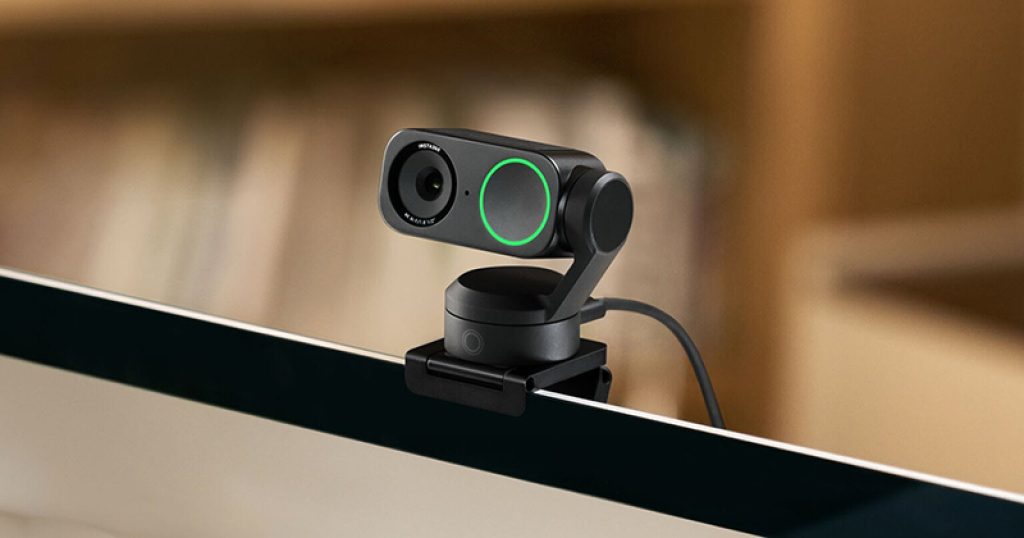
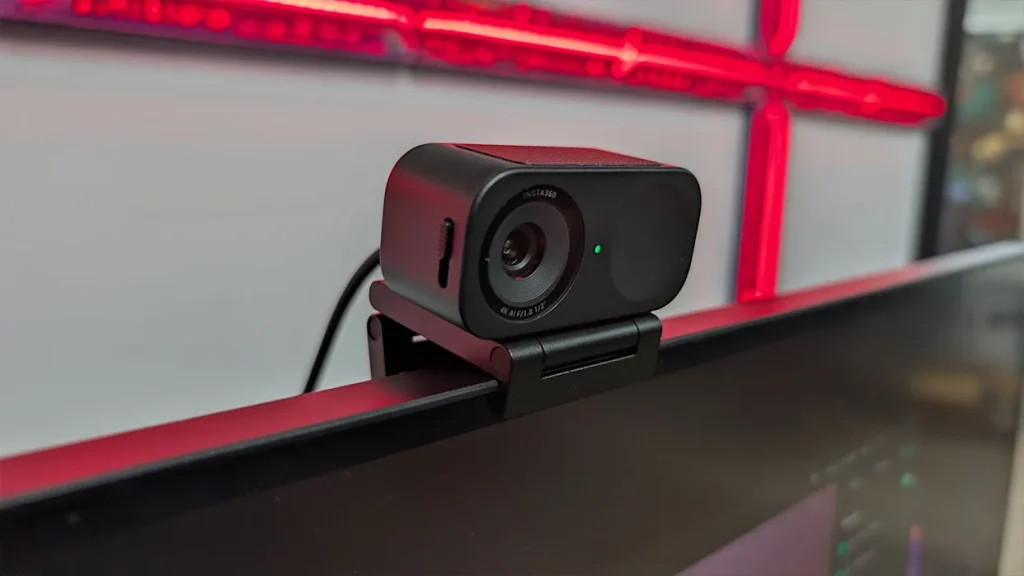
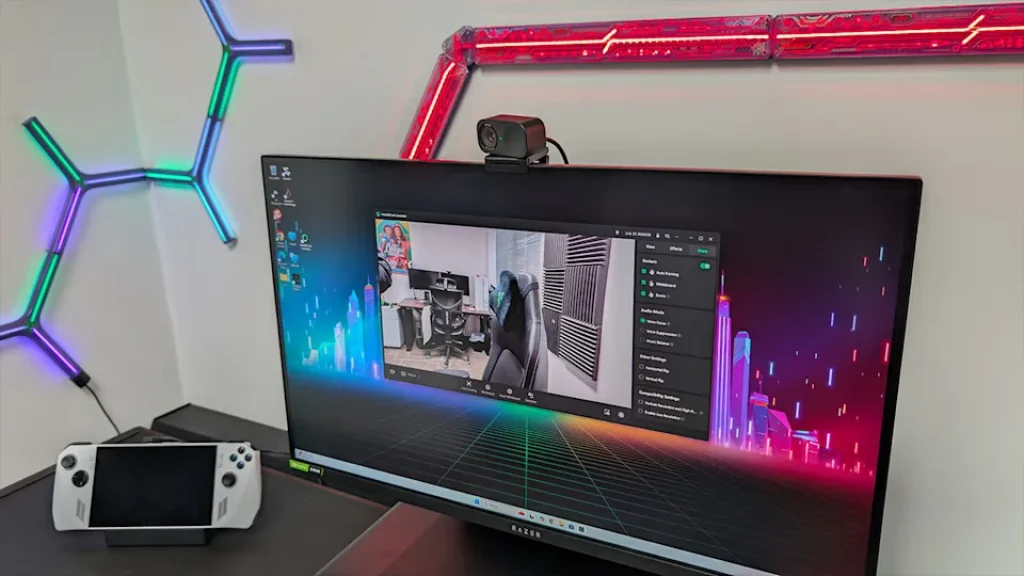
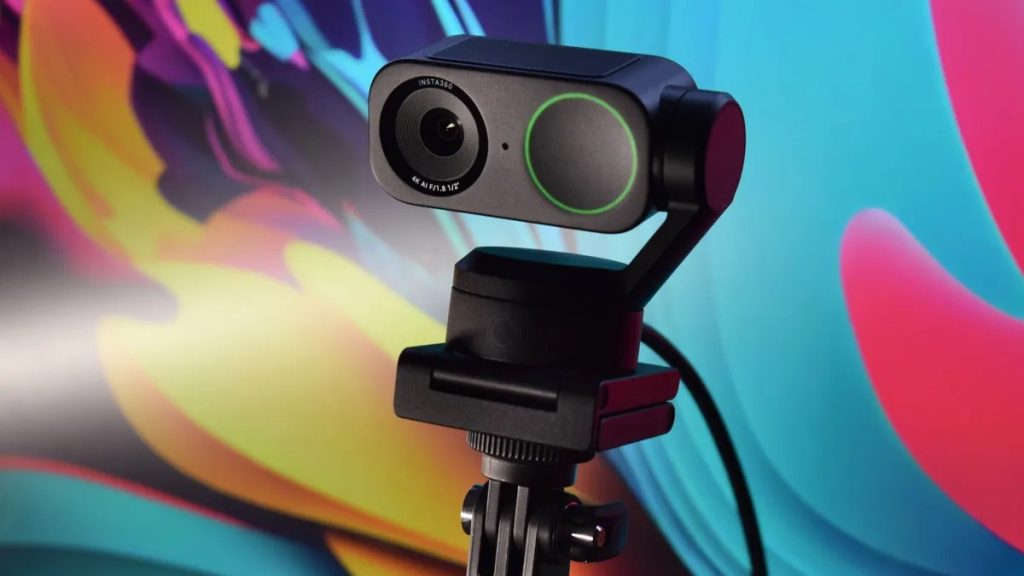
The INSTA360 LINK 2C has been engineered to be ultra‑portable and discreet, distinguishing itself from other models in the Insta360 Link lineup that often feature motorized gimbals. The camera measures just 2.5 inches wide, 1.2 inches high, and 1 inch deep – about the size of a large coin. It weighs only 46.5 grams without the magnetic mount, making it almost unnoticeable when clipped onto a laptop lid or display.
The build quality is solid, with a premium matte finish available in Graphite Black and Arctic White. The front of the camera houses the glass lens, a status LED, and dual microphone grilles. On the top edge, you will find a physical privacy switch that mechanically blocks the lens – a simple but important security feature.
The magnetic mounting system is a standout design element. The included magnetic mount attaches securely to the back of the camera and can be stuck onto any metal surface. For displays without a magnetic surface, the mount also includes a standard 1/4‑inch tripod thread, allowing you to attach the camera to any tripod, monitor arm, or dedicated webcam stand. The Type‑C to USB‑C data cable is included, as is a USB‑C to USB‑A adapter for older systems.
Video Quality: Where The Link 2C Shines
The 1/2‑inch CMOS sensor is the real star of the show. Most built‑in laptop cameras use sensors that are fractions of an inch in size, which struggle in anything but perfect lighting. The larger 1/2‑inch sensor captures significantly more light, resulting in cleaner, sharper, and more detailed video.
In real‑world testing, the difference is immediately obvious. Skin tones appear natural and accurate, without the washed‑out or overly processed look common in many webcams. Textures, such as fabric patterns or individual hairs, are rendered with clarity rather than smeared together. The f/1.8 aperture allows the camera to maintain good exposure even in dimly lit rooms, where typical webcams would become dark or grainy.
The camera supports HDR (High Dynamic Range) video, which helps balance bright and dark areas within the same frame. This is particularly useful if you have a bright window behind you; the camera will try to keep your face properly exposed while also retaining some detail in the background, rather than blowing out the highlights.
The INSTA360 LINK 2C shoots 4K video at 30 frames per second. While it does not support 4K at 60fps, the vast majority of video conferencing platforms cap out at 1080p or 720p anyway. The higher resolution is most beneficial for cropping or zooming in without losing detail, or for recording high‑quality content for later editing. For smoother motion in applications that support it, you can drop the resolution to 1080p or 720p and run at 60fps.
AI Features: Auto Framing And Gesture Control
The AI software is a major differentiator between the INSTA360 LINK 2C and cheaper, no‑name webcams. Unlike the motorized tracking found on the more expensive Link 2 Pro, the Link 2C uses digital cropping to achieve its auto‑framing. A dedicated AI chip analyzes the video feed and keeps you centered in the frame as you move around.
This digital approach has trade‑offs. It works very well for the small movements typical of a person sitting at a desk – shifting in your chair, leaning forward, gesturing, or turning your head. However, it can struggle to keep up with very quick movements, and because it is a digital crop, the effective resolution of the video may decrease slightly if you move far from the center. For conference calls and standard streaming, the effect is seamless and a major upgrade over a static frame.
Gesture control is a genuinely useful feature that feels like magic. Hold your palm up to the camera to enable or disable auto‑framing. Make an L‑shape with your thumb and index finger to zoom in digitally. These gestures allow you to control the camera without touching your keyboard or mouse, which is handy during presentations or when you are on a call and want to reframe quickly.
Whiteboard mode is a clever feature for educators or anyone who needs to present physical documents. When enabled, the camera will automatically detect a whiteboard or sticky note in the frame, digitally correct the perspective (making it appear front‑on), and zoom in on the content. Desktop view mode works similarly for showing objects or documents on your desk.
Microphone Quality: AI Noise Reduction
Many webcams treat audio as an afterthought. The INSTA360 LINK 2C does not. It features dual microphones that work with an AI‑powered noise reduction algorithm. The microphones are tuned to focus on the human voice while actively filtering out background distractions such as typing, HVAC noise, or ambient room sounds.
For meetings, calls, and casual streaming, the built‑in microphones are more than sufficient, eliminating the need for a separate headset or USB microphone in many scenarios. The AI noise reduction can be controlled and adjusted via the companion software. While the absolute audio quality cannot compete with a high‑end studio microphone, it is far ahead of any laptop‘s built‑in array and puts the Link 2C in the same league as dedicated conference speakerphones for vocal clarity.
Software Experience: Insta360 Link Controller
The webcam is driver‑free for basic functionality, meaning you can plug it in and it will work immediately as a standard UVC (USB Video Class) device. However, to unlock the AI features – auto framing, gesture control, whiteboard mode, HDR, and microphone adjustments – you will want to install the free Insta360 Link Controller software.
The software is available for both Windows and macOS. It provides a clean interface where you can adjust exposure, white balance, field of view (narrow, medium, wide, and ultra-wide), and digital zoom. You can also enable or disable HDR, AI framing, and gesture controls, as well as adjust the noise reduction strength for the microphone. The software receives regular updates, adding new features and improving existing ones. A notable update added the ability to flip the image, which is useful for certain streaming setups.
Insta360 Link 2C Vs Link 2 Pro Vs Link Original
The INSTA360 LINK 2C sits at the more affordable end of the Link series. To help you decide which model is right for you, here is a comparison of the key differences.
| Aspect | Insta360 Link 2C | Insta360 Link 2 Pro | Insta360 Link (Original) |
|---|---|---|---|
| Sensor | 1/2‑inch CMOS | 1/2‑inch CMOS | 1/2.5‑inch CMOS |
| Gimbal | No (digital cropping) | Yes (motorized 3‑axis) | Yes (motorized 2‑axis) |
| Max Resolution | 4K at 30fps | 4K at 30fps | 4K at 30fps |
| AI Auto Framing | Yes (digital, software‑based) | Yes (physical tracking with gimbal) | Yes (physical tracking with gimbal) |
| Gesture Control | Yes | Yes | Yes |
| Audio | Dual mics with AI noise reduction | Dual mics with AI noise reduction | Single mic |
| Privacy Switch | Yes (physical) | Yes (physical) | No (lens cap) |
| Form Factor | Compact, static | Larger, motorized | Larger, motorized |
| Price (Sale) | 120(downfrom150) | $200 (typical) | $150‑180 (discontinued) |
Why choose the Link 2C: Choose the Link 2C if you want the best image quality for the lowest price and you do not need a motorized gimbal. The digital AI framing works well for standard desk work.
Why This Deal Matters
The 30 US dollar discount on the INSTA360 LINK 2C brings it closer to the impulse buy category than ever before. As one of the best webcams on the market, it offers a significant upgrade in video quality without overcomplicating the setup. At 120 US dollars, it is now only 20 US dollars more than the webcam‘s lowest recorded price, making this spring sale offer a rare and compelling opportunity.
The Verge notes that the last‑gen Insta360 Link 2C is a fantastic 4K webcam now that it is 20 percent off. You would be hard‑pressed to find a better option for 119.99 US dollars. The Verge also points out that the Link 2C is the cheapest Link you can buy right now, and as such, it lacks the motorized gimbal found on its pricier counterparts. This is not a flaw but a deliberate trade‑off for portability and price.
A Chinese technology review site commented that after the price drop to 119.99 US dollars, the Link 2C becomes even more worth buying. It is not a new product – it could even be considered “last‑generation“ – but after a roughly 20 percent discount, it falls into a very attractive price bracket. You are not paying extra for flashy features you might not need.
Customer Feedback And Professional Review Highlights
Positive reviews consistently praise the image quality. Reviewers highlight the sharp 4K resolution, excellent low‑light performance, and AI framing that works reliably. The dual microphones with AI noise reduction are frequently mentioned as a standout feature, often removing the need for a separate microphone. The compact size and magnetic mount make it easy to attach to any laptop or monitor.
Constructive criticism has been noted in professional tests. Some users have reported that the camera can get quite warm during extended use, though this has not been linked to performance issues or shutdowns. The digital auto‑framing, while effective for typical desk movements, can struggle to keep up with very quick movements. A reviewer from an Australian news outlet noted that in testing, the camera struggled to keep up with very quick movements, as you would expect. The reliance on USB‑C 2.0 speeds means the camera uses compression for its 4K feed, which is standard at this price point.
One reviewer from PCMag criticized the video quality of an early Link 2 model, stating it was not particularly sharp and showed significant background noise even in a fully lit environment. It is important to note that this review likely refers to an earlier or different model and not the refined Link 2C with subsequent firmware updates. Most reviews from trusted sources are overwhelmingly positive.
Pros And Cons Of The Insta360 Link 2C
Pros
- Excellent 4K video quality with a large 1/2‑inch sensor that performs well in low light
- AI‑powered auto‑framing keeps you centered in the frame without a motorized gimbal
- Dual microphones with AI noise reduction produce clear voice audio for meetings and calls
- Compact, lightweight design with a magnetic mount for easy attachment and portability
- Gesture controls and whiteboard mode are genuinely useful productivity features
- Physical privacy switch provides immediate, visual assurance of privacy
- Driver‑free operation with optional, powerful software for fine‑tuning
- Significant upgrade over any built‑in laptop webcam at an accessible price point
Cons
- Digital auto‑framing can struggle with very quick movements, as the camera uses a digital crop
- 4K capture limited to 30fps; 60fps only available at 1080p or 720p
- Camera body can become warm during extended use, though this has not been linked to failures
- USB‑C 2.0 connection means compressed video feed, not raw or uncompressed
- Requires software installation to unlock all AI features
- No motorized gimbal, so physical movement tracking is limited compared to the Pro model
- Some early firmware versions had occasional glitches, though these have been largely resolved
Frequently Asked Questions (FAQs)
What is the difference between the Insta360 Link 2C and the Insta360 Link 2 Pro?
The Link 2C has a compact, static design with digital auto‑framing, making it highly portable and less expensive. The Link 2 Pro includes a motorized 3‑axis gimbal for physical movement tracking, which allows it to follow you over a wider range of motion. Both share the same 1/2‑inch sensor, 4K video resolution, and AI features. The Link 2C is ideal for desk work and conference calls, while the Link 2 Pro is better for standing presentations, teaching, or workout streaming.
Is the Insta360 Link 2C compatible with Mac and Windows?
Yes. The camera is driver‑free and works as a standard UVC device on both macOS and Windows. For full access to AI features, gesture controls, and whiteboard mode, you can install the free Insta360 Link Controller software, which is available for both operating systems.
Do I need a separate microphone with the Link 2C?
Not for most users. The dual microphones with AI noise reduction are excellent for meetings, conference calls, and casual streaming. They effectively filter out keyboard typing, fan noise, and other background distractions. For professional voiceover work, podcasting, or high‑quality music streaming, you may still want a dedicated USB microphone.