



The Framework Desktop is a pint-sized powerhouse that challenges assumptions about small-form-factor PCs. At just 4.5 liters, it packs an AMD Strix Halo APU with up to 128GB of unified memory and integrated Radeon 8060S graphics. It delivers genuine 1080p gaming performance, excellent AI and productivity chops, and a surprisingly low noise profile. However, the very things that make Framework famous — modularity and upgradeability — are largely absent here. The APU and RAM are soldered, limiting long-term flexibility. At a starting price of 1,099 USD (and over 2,600 USD as tested), this machine is a niche product for early adopters, AI enthusiasts, and those who prioritize extreme compactness over future-proofing. This review synthesizes feedback from multiple expert sources to give you the full picture.
Table of Contents
Key Specifications Of The Framework Desktop
The Framework Desktop is built around AMD‘s Ryzen AI Max series, codenamed Strix Halo. Below is a summary of the core specifications based on product listings and expert reviews.
| Feature | Framework Desktop (Base Model) | Framework Desktop (As Tested / Max Config) |
|---|---|---|
| Processor | AMD Ryzen AI Max 385 (8 cores, 16 threads) | AMD Ryzen AI Max+ 395 (16 cores, 32 threads) |
| GPU | AMD Radeon 8050S (32 CUs) | AMD Radeon 8060S (40 CUs) |
| Memory | 32GB unified LPDDR5x-8000 (soldered) | 128GB unified LPDDR5x-8000 (soldered) |
| Storage | Configurable M.2 SSD (DIY option) | 2TB WD 7100 SSD (as tested) |
| Wireless | Wi-Fi 7, Bluetooth 5.4 (RZ717 chip) | Wi-Fi 7, Bluetooth 5.4 |
| Rear I/O | HDMI 2.1, 2x DisplayPort 2.1, 2x USB4, 2x USB-A 3.2, 5Gb Ethernet, 3.5mm audio | Same |
| Front I/O | 2x slots for swappable expansion cards (USB-C, USB-A, SD, etc.) | Same |
| Power Supply | Included FlexATX PSU (no power cord) | 120W (140W boost) |
| Chassis Volume | 4.5 liters (Mini-ITX) | 4.5 liters |
| Dimensions | 96.8 x 205.5 x 226.1 mm (3.8 x 8.1 x 8.9 inches) | Same |
| Weight | Approximately 3.1 kg (6.8 lbs) | Same |
The unified memory architecture allows the integrated GPU to access up to 128GB of system RAM, making the Framework Desktop unusually capable for AI model loading and large-dataset work. However, the APU and RAM are soldered to the mainboard, which severely limits future upgrades.
Design And Build Quality: Compact And Clever, But Cheap Touches
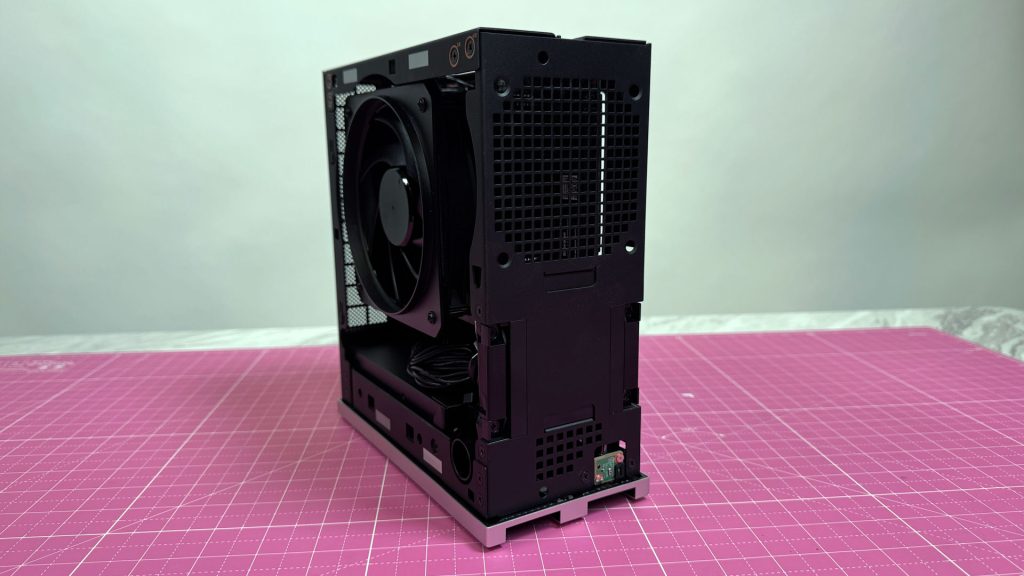
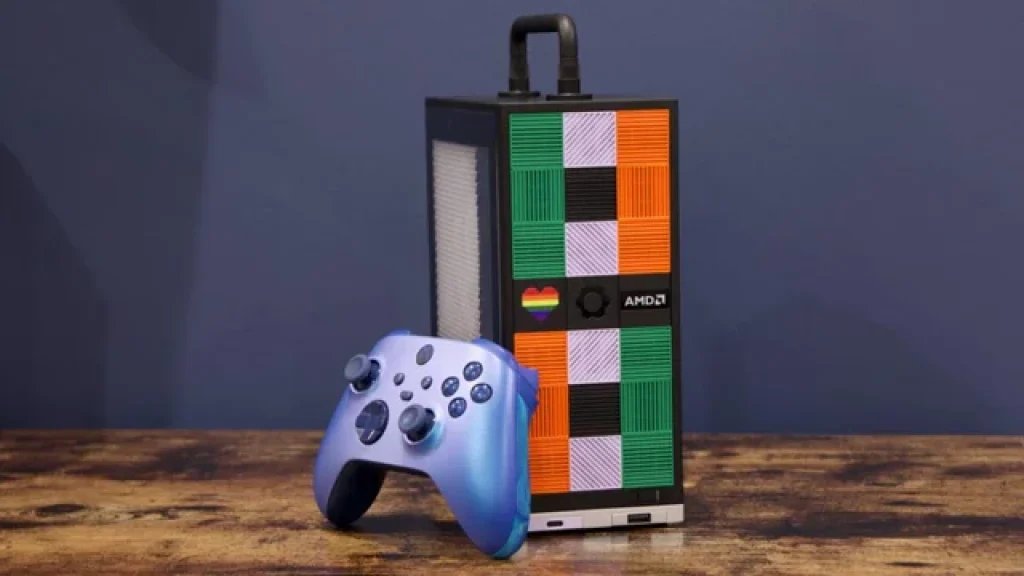
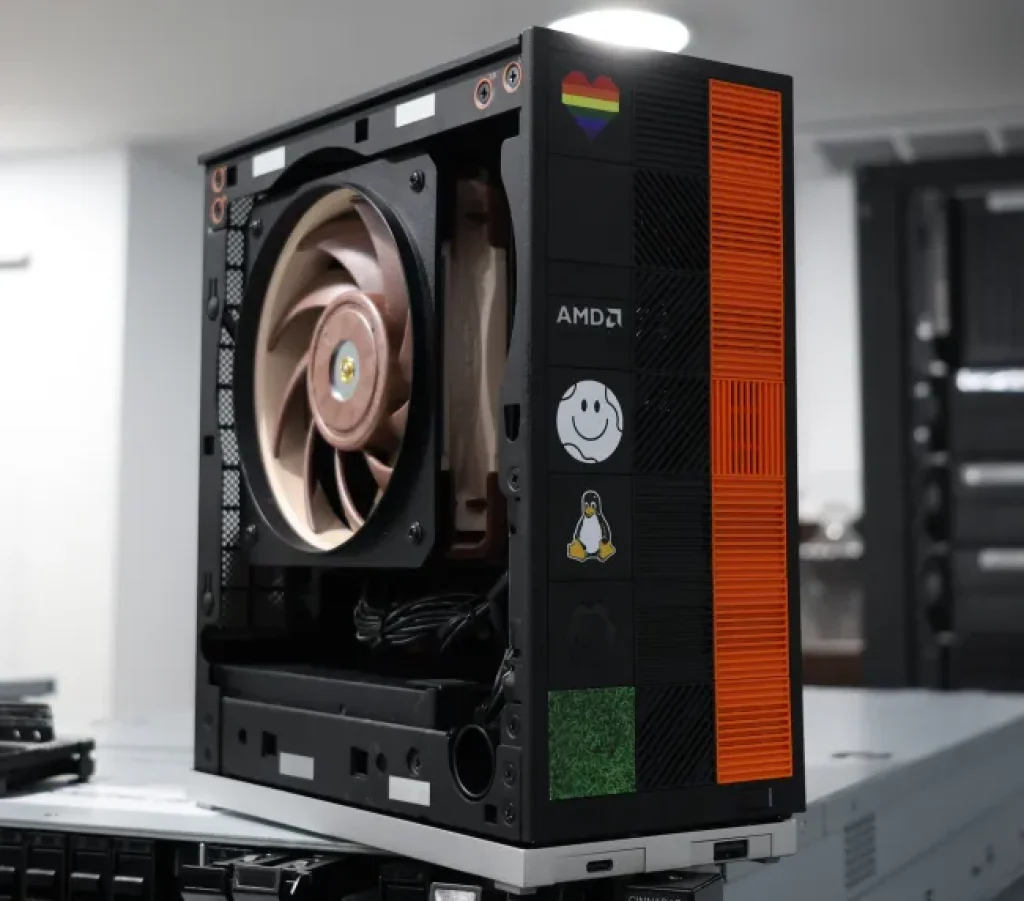
The Framework Desktop is undeniably small. Its 4.5-liter chassis is about the size of a Mac Mini but slightly taller. It‘s designed to sit on a desk, not under it, and the customizable front tile system is genuinely fun. You can order colored tiles or 3D print your own using the open-source designs.
On the rear, you will find a respectable selection of ports: HDMI 2.1, two DisplayPort 2.1, two USB4 Type-C, two USB-A 3.2, a 5Gb Ethernet port, and a 3.5mm audio jack. The front panel features two expansion card slots, which let you swap in extra USB-C, USB-A, SD, microSD, or storage modules. This modular front I/O is a genuine convenience, letting you tailor the ports to your needs.
However, the build quality has drawn criticism. One reviewer notes that the case feels “kind of cheap” for a machine at this price point. The white plastic bezels are large for a 2026 product, and the external power brick feels unnecessary for a 120-140W device. While the intention is to keep the internal power supply compact, many users would prefer an internal PSU to reduce desk clutter. The DIY Edition requires you to attach the SSD yourself, which can be a delicate process due to the tight space.
Performance And User Experience: Quieter Than You Would Expect
One of the standout qualities of the Framework Desktop is its acoustic performance. During normal productivity and even moderate gaming, the system remains whisper-quiet. Even under sustained load, reviewers consistently praised the low noise output. The PSU fan can briefly spin up every few minutes, but overall, this is one of the quietest small-form-factor PCs on the market.
Setup is straightforward for the DIY model: you install your own M.2 SSD, attach the PSU, and close the case. Framework provides clear documentation, and the process takes about 15 minutes. The experience feels more like assembling a PC than unboxing an appliance — which will appeal to enthusiasts but may deter total beginners.
One minor but frustrating cost-cutting measure: the PSU cable is not included. You will need to supply your own standard IEC C13 power cord.
Performance: Strong Integrated Graphics And AI Muscle
The Framework Desktop‘s performance is best understood in two parts: gaming and AI productivity.
Gaming performance: The integrated Radeon 8060S GPU (40 CUs) consistently delivers playable framerates at 1080p. In titles like Cyberpunk 2077, Call of Duty, and esports games, the system performs roughly on par with a desktop NVIDIA RTX 4060. This is remarkable for a 4.5-liter machine with no discrete graphics card. However, it is not a pure gaming PC. A small-form-factor build with a discrete RTX 4060 or 4070 would cost significantly less and deliver equal or better performance. The Framework Desktop‘s gaming prowess is a byproduct of its design, not the primary design goal.
In productivity tasks, the 16-core Zen 5 CPU crushes multi-threaded workloads like video encoding, compiling, and 3D rendering. It trades blows with the Mac Mini M4, being slightly slower in single-core but faster in multi-core and on the graphics side.
AI and local LLM performance: This is where the Framework Desktop truly shines. The unified memory architecture (up to 128GB) allows the GPU to load and run very large AI models directly in system RAM. One reviewer concluded that the Framework Desktop is a miniature workstation with unprecedented AI processing power at its silicon fingertips. Community reports confirm that it runs LLMs like Llama 3 70B and other large models smoothly. The combination of high memory bandwidth and the efficient RDNA 3.5 GPU makes this an ideal machine for developers, AI researchers, and hobbyists running local inference.
Upgradeability: The Central Contradiction
Framework‘s brand is built on repairability and modularity. The laptop is revolutionary because users can replace the mainboard, ports, and even the screen. On a desktop, the value proposition is murkier. Desktop PCs are already modular; you can swap the CPU, GPU, RAM, and storage. The Framework Desktop, however, has the CPU and RAM soldered directly to the mainboard.
You cannot upgrade the processor, and you cannot add more RAM. This is a significant departure from the traditional desktop promise. One reviewer gave the machine a 7.7 out of 10, deducting points precisely for this reason, noting that it is partly a pre-built Mini-ITX PC, lacking some of the upgradeability you might expect. Indeed, the machine is more akin to a Mac Mini than a build-your-own PC.
While you can upgrade the storage and replace the front I/O cards, the core components are fixed at purchase. This will be a deal-breaker for anyone who expects a Framework product to be endlessly serviceable.
Pricing And Availability
Pricing for the Framework Desktop has been fluid due to component shortages. The DIY base model (barebones, no RAM or SSD) started at around 1,099 USD, but price hikes have pushed it higher. The fully loaded version with 128GB RAM, the 16-core CPU, and a 2TB SSD is listed at approximately 2,605 USD. In Europe, prices exceed 2,300 EUR for the top configuration. Shipping began in Q3 2025, and as of mid-2026, units are shipping in batches. The company has not announced a permanent price reduction.
Framework Desktop Vs Mac Mini M4 Vs Custom ITX Build
The table below summarizes how the Framework Desktop stacks up against its two most natural competitors: the Apple Mac Mini M4 (non-Pro) and a custom small-form-factor PC with an RTX 4060.
| Aspect | Framework Desktop (16-core / 128GB) | Apple Mac Mini M4 (base) | Custom ITX Gaming PC (e.g., RTX 4060) |
|---|---|---|---|
| CPU | AMD Ryzen AI Max+ 395 (16-core) | Apple M4 (10-core) | Intel or AMD mid-range (6-8 core) |
| RAM | 128GB (unified, soldered) | 16GB (unified, soldered) | 32GB (upgradeable) |
| GPU | Radeon 8060S (integrated) | M4 integrated graphics | RTX 4060 (discrete) |
| Gaming Performance | 1080p mid-high (approx RTX 4060) | Basic (esports only) | 1080p high / 1440p medium |
| AI / LLM Performance | Excellent (can run 70B models) | Limited by RAM | Good (with discrete GPU) |
| Upgradeability | Low (CPU and RAM soldered) | None | High (all parts swappable) |
| Noise | Very quiet (under load) | Silent (fanless) | Moderate (depends on cooler) |
| Price (approximate) | 1,100 – 2,600 USD | 599 – 1,299 USD | 800 – 1,300 USD |
| Best For | AI development, compact workstation | General use, content creation | Pure gaming, professional workloads |
The Framework Desktop clearly targets a different audience than a pure gaming PC. Its high unified memory and strong integrated graphics make it a niche product for AI development and compact workstation tasks. For general content creation, the Mac Mini M4 is more affordable and silent. For pure gaming, a custom ITX build offers better performance for less money.
Pros And Cons Of The Framework Desktop
Pros
- Very powerful integrated Radeon 8060S GPU that delivers smooth 1080p gaming.
- Up to 128GB of unified LPDDR5x memory, ideal for large AI models and RAM-intensive workflows.
- Compact 4.5-liter Mini-ITX chassis that is easy to transport and fits on any desk.
- Quiet operation even under sustained gaming or AI loads.
- Customizable front I/O tiles (USB-C, USB-A, SD) and open-source 3D-printable designs.
- Strong multi-core CPU performance for productivity, compiling, and rendering.
- Option to buy as a DIY barebones kit, which appeals to enthusiasts.
- Low power consumption (120W typical) relative to the performance on offer.
Cons
- CPU and RAM are permanently soldered to the mainboard; no future upgrades.
- Expensive, especially for the top-tier configuration (over 2,600 USD as tested).
- Feels less “Framework” than the laptop; the desktop market is already modular.
- Cheap plastic build quality does not feel premium at this price point.
- Limited rear USB ports; only two USB-A and two USB4 Type-C.
- No PSU power cord included in the box, a minor but frustrating omission.
- Not a pure gaming PC; custom ITX rigs offer better FPS for less money.
- Shipping delays and price fluctuations due to component shortages have been reported.
Frequently Asked Questions (FAQs)
Is the Framework Desktop upgradeable?
No, not in the way you might expect. The AMD Strix Halo APU and the LPDDR5x RAM are soldered directly to the mainboard. You cannot replace the processor or add more RAM after purchase. You can, however, upgrade the M.2 SSD and swap the front I/O expansion cards. This is a significant departure from the traditional desktop ethos.
What is the Framework Desktop best used for?
The Framework Desktop excels at AI development and local LLM inference. Its large unified memory pool (up to 128GB) lets you run models that would be impossible on systems with discrete GPU RAM limits. It is also a competent compact workstation for software development, video editing, and moderate 1080p gaming. It is not the best choice for dedicated PC gaming due to its price and upgrade limitations.