




The MacBook Neo is the most affordable MacBook Apple has ever made. It starts at just 599 US dollars, which is 500 dollars cheaper than the M5 MacBook Air. The name “Neo” is intentional. Apple is appealing to new users who cannot afford to spend more than 1,000 dollars on a laptop, and to parents who are not willing to spend a lot of money on a laptop for their children. The MacBook Neo is a perfect compromise. By far the most affordable MacBook, it still offers the same premium design and durability as Apple‘s pricier MacBooks. It is also lightweight and compact, making it easy to carry, and comes in three fun colors plus standard silver.
The CNET review team gave the MacBook Neo a score of 8.3 out of 10, praising its premium look and feel at a much lower cost. The review notes that the A18 Pro chip is powerful enough to provide a fulfilling MacOS experience, and the stereo speakers sound surprisingly impressive. However, the review also points out that Touch ID costs an extra 100 dollars, the baseline 256GB SSD will fill up fast, and there is no MagSafe or fast charging. This review covers design, performance, battery life, missing features, and overall value.
Table of Contents
Key Specifications Of The MacBook Neo
The MacBook Neo is built around the A18 Pro chip from the iPhone 16 Pro. The table below summarizes its core specifications based on the CNET review.
| Feature | Specification |
|---|---|
| Processor | Apple A18 Pro (6-core CPU: 2 performance, 4 efficiency) |
| Graphics | Integrated A18 Pro 5-core GPU |
| Memory | 8GB unified memory (soldered, not upgradeable) |
| Storage | 256GB SSD (base model) / 512GB SSD (with Touch ID upgrade) |
| Display | 13-inch Liquid Retina IPS, 2,480 x 1,506 resolution, 500 nits brightness |
| Ports | USB 3 (USB-C), USB 2 (USB-C), 3.5mm headphone jack |
| Networking | Wi-Fi 6E, Bluetooth 6 |
| Camera | 1080p FaceTime HD webcam (no Center Stage or Desk View) |
| Audio | Stereo speakers with spatial audio support |
| Trackpad | Mechanical (not Force Touch) |
| Battery | 36.5 watt-hour |
| Weight | 2.7 pounds (1.2 kg) |
| Dimensions | 0.5 inches thick |
| Colors | Silver, Blush, Citrus, Indigo |
| Starting Price | 599 USD / 599 GBP / 899 AUD |
| CNET Score | 8.3 out of 10 |
Design And Build Quality: Premium MacBook Look And Feel For Less
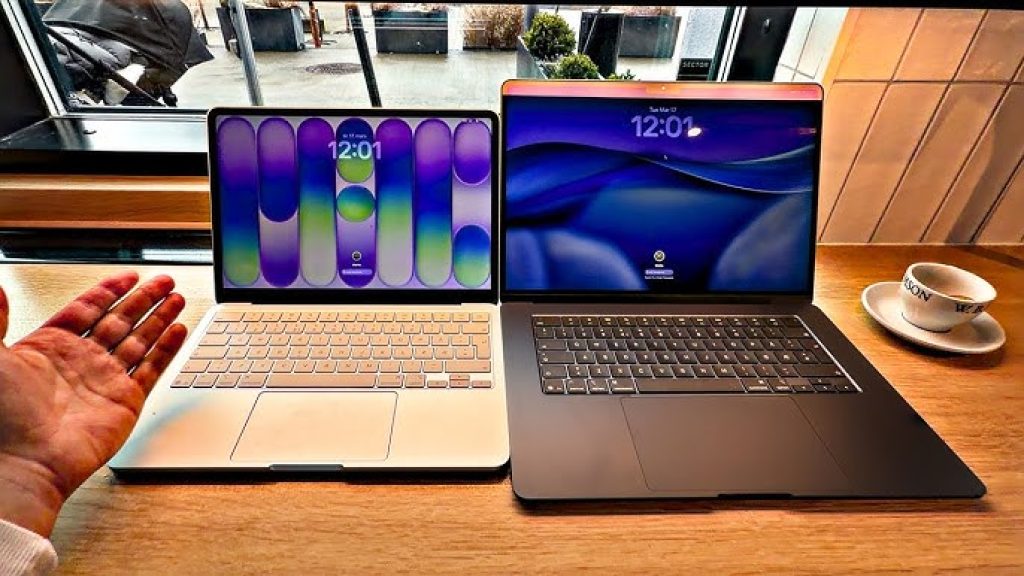
The MacBook Neo drops the entry point of an Apple laptop by a whopping 500 dollars. The M5 MacBook Air starts at 1,099 dollars, and the Neo costs just 599 dollars. The MacBook Neo does not look like a 600-dollar laptop. Most laptops at this price have a mixture of aluminum and plastic, if they are not entirely made of plastic. You might get an aluminum lid to protect the display, but the keyboard deck and bottom panel are probably plastic in most budget laptops. Or if you find one with an all-aluminum design, it is thin and flimsy. There is none of that with the Neo.
It looks and feels like a slightly shrunken-down MacBook Air or Pro. Like MacBook Air and Pro models, the Neo has a sturdy, all-aluminum body. It feels just as rigid as a MacBook Air or Pro with the same luxurious look. The Neo does not cheapen the MacBook brand. The only differences between the Neo‘s appearance and the Air’s, aside from being a bit more compact and the color choices, are the Neo‘s softer, more rounded lid edges and the color-matched keyboard. Instead of black keys, the Neo’s match the body’s color.
Despite being slightly more compact than the MacBook Air, the MacBook Neo is a hair thicker at 0.5 inches (versus the Air at 0.4 inches) and weighs the same at 2.7 pounds. The Neo’s display bezels are also a bit thicker than the Air’s, but Apple uses the bigger top bezel to hide the webcam. In other words, there is no notch in the menu bar to house the camera, which makes the thicker bezels more palatable. The Neo forces you to make do with less performance and some missing features compared with the MacBook Air, but the design and build quality are undeniably premium.
The MacBook Neo features a 13-inch Liquid Retina display with a 2,480 by 1,506 pixel resolution. Text and images appear just as sharp as they do on the MacBook Air, which has a 13.6-inch panel with a similar 2,560 by 1,664 pixel resolution. And it proved to be a bit brighter than the M5 MacBook Air. Both displays are rated for an ample 500 nits of brightness (most budget laptops fall between 300 and 400 nits, with some as low as 250 nits), but the Neo reached a peak brightness of 518 nits during display tests. The M5 Air hit its rated brightness on the nose, reaching 500 nits.
The Neo‘s color performance is merely mediocre, but people who engage in color-accurate graphics work are not the Neo’s audience. On tests, the MacBook Neo covered 98% of sRGB, 73% of AdobeRGB and 74% of P3. Compare that with the M5 Air, which hit 100% of sRGB, 86% of AdobeRGB, and 98% of P3. But again, color performance is not likely high on a budget laptop shopper‘s priority list.
Missing Features: Touch ID, MagSafe And More
Apple sent the reviewer the base 599-dollar model that has a 256GB SSD and a lock button in the top right of the keyboard, where a Touch ID sensor should be. You can add Touch ID for an extra 100 dollars, which also doubles the storage to a 512GB SSD. The reviewer notes that they would spend 100 dollars just to get Touch ID because they use it so frequently, not just to get past the MacOS lock screen but to access various online accounts and make online purchases. Most users will also quickly fill the 256GB SSD to capacity. After logging in with an Apple ID, only 145GB of free storage remained on the Neo‘s 256GB drive, with roughly 25GB allocated each to Messages, Photos, Applications and MacOS Tahoe itself. The added storage space and Touch ID are well worth the added 100 dollars.
The feature that is missed most that you cannot add to the MacBook Neo is MagSafe charging. The reviewer likes the satisfying snap when connecting the MagSafe cable to a MacBook, and the peace of mind that comes with knowing the cable will release easily and will not pull the MacBook to the ground if you trip over the cord. The Neo offers USB-C charging, which does not snap into place or disconnect as easily. And it does not charge as fast.
The Neo comes with a 20-watt power adapter that does not charge the battery as fast as even the standard 40- to 60-watt dynamic charger that comes with the M5 Air. The Neo took about an hour to charge the battery to 50%, which the M5 Air did in approximately half that time. The Neo took 1 hour and 45 minutes to reach 80% and 2.5 hours to reach full charge. The power cord is also 20 inches shorter than the Air‘s, which might cramp your style if you need to charge in a coffee shop or lunchroom and are not sitting right next to an outlet.
There are other features that go missing on the MacBook Neo that you get with the Air, and the reviewer is willing to concede that to shave 500 dollars off the cost. The Neo has 8GB of RAM, which is half the MacBook Air’s memory, and you cannot upgrade it. For light use such as Google Docs and Sheets with dozens of other open tabs, light photo editing, and streaming music, the 8GB suffices. The reviewer had an entirely pleasant MacOS experience and rarely saw the spinning beachball.
When the reviewer saw that the MacBook Neo has a mechanical trackpad instead of the Force Touch trackpad you get with the Air, they were certain they would miss the haptic feedback. But the Neo‘s mechanical touchpad is surprisingly awesome. It offers a consistent click response across its entire surface. There is not even a hint of the diving-board effect that plagues most mechanical keyboards; a click on the top edge feels no different than a click on the bottom edge.
The reviewer was also ready to complain about the lack of keyboard backlighting, but the color-matched keys are not just for cosmetic reasons. At least with the blush MacBook Neo, the dark gray key icons against the light pink color of the keys themselves make the keys stay more visible in low light than the MacBook Air’s black keys with white icons. The Neo‘s side-firing speakers deliver impressive stereo sound, nearly as good as the Air’s quad-speaker array. The Neo lacks Thunderbolt 4 ports, but most files can be transferred via the cloud. The 1080p webcam works fine but does not support Center Stage or Desk View.
Performance And Battery Life
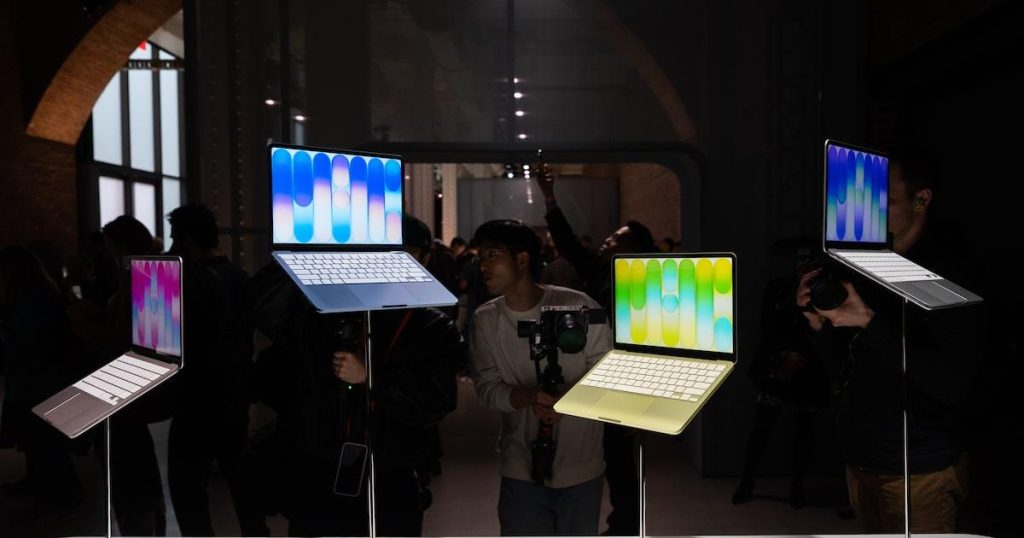
The biggest change between the Neo and other MacBooks is the processor. The Neo does not use one of Apple‘s M-series processors but an iPhone chip, the A18 Pro that was introduced with the iPhone 16 Pro in 2024. The A18 Pro has a six-core CPU (two performance cores and four efficiency cores) and a five-core GPU. Compare that with the M5 chip that powers the new MacBook Air, which has a 10-core CPU and either an eight- or 10-core GPU. The Neo’s core count is closer to the M1 MacBook Air‘s from 2020, but the older M1 Air actually has more, with eight CPU cores and seven GPU cores.
Those extra cores show up in multicore tests where the Neo finished near or at the back of the pack. It was able to edge the M1 Air on the multicore test of Geekbench 6, but its multicore score on Cinebench 2024 was well off the pace of the other MacBooks. The Neo was more competitive on single-core versions of these tests, where its scores were on par with those of the M3 MacBook Air. This greater single-core performance shows up in everyday activities like opening apps, switching windows and basic productivity tasks like emailing and word processing, where these simple actions feel snappy and responsive.
Since the MacBook Neo‘s low price puts it in competition with Chromebooks, the reviewer ran a couple of Chromebook benchmarks on it. The Neo dusted its Chromebook competition. The Neo’s battery life was also better than many Chromebooks tested, but it is still several hours shorter than that of other MacBooks. It lasted nearly 13.5 hours in a YouTube streaming battery-drain test, which was about 3.5 hours shorter than the M5 MacBook Air and more than 2 hours shorter than the M1 MacBook Air.
While 13.5 hours should be enough to last through a long day at school or work, it does not give you the carefree ability to leave your MacBook unplugged for a couple of days at a time. With the MacBook Neo, you will probably want to remember to charge it each night. The Neo‘s battery is much smaller than the Air’s. It has a 36.5 watt-hour battery compared with the Air‘s bigger 53.8 watt-hour battery. Given how close the two laptops are in size, the difference in battery capacity is surprising.
MacBook Neo Vs MacBook Air
The table below summarizes how the MacBook Neo stacks up against the M5 MacBook Air.
| Aspect | MacBook Neo | MacBook Air M5 |
|---|---|---|
| Starting Price | 599 USD | 1,099 USD |
| Processor | A18 Pro (6-core CPU, 5-core GPU) | M5 (10-core CPU, 8 or 10-core GPU) |
| Memory | 8GB unified (not upgradeable) | 16GB unified (upgradeable) |
| Display | 13-inch Liquid Retina IPS, 500 nits | 13.6-inch Liquid Retina IPS, 500 nits |
| Ports | USB 3 and USB 2 (USB-C) | Two Thunderbolt 4 / USB 4 |
| Wireless | Wi-Fi 6E | Wi-Fi 7 |
| Touch ID | Extra 100 dollars (with 512GB SSD) | Included |
| MagSafe | No | Yes |
| Battery Size | 36.5 watt-hour | 53.8 watt-hour |
| Battery Life (tested) | 13.5 hours | 17+ hours |
| Trackpad | Mechanical | Force Touch |
| Weight | 2.7 pounds | 2.7 pounds |
| Best For | Budget buyers, students, casual use | Power users, creators, frequent travelers |
Pros And Cons Of The MacBook Neo
Pros
- Premium MacBook look and feel at a much lower cost, with a sturdy all-aluminum body.
- 13-inch display is not much smaller than the MacBook Air‘s and is actually slightly brighter.
- A18 Pro chip is powerful enough to provide a fulfilling MacOS experience for everyday tasks.
- Surprisingly impressive sound from stereo speakers with spatial audio.
- Color-matched keyboard and fun color options (Blush, Citrus, Indigo, Silver).
- Lightweight and compact, easy to carry in a backpack.
- Starts at only 599 dollars, with an additional 100 dollars educational discount for students.
- The base model is more than powerful enough for typical school, office, and casual home use.
Cons
- Touch ID costs an extra 100 dollars and is not available on the base model.
- Baseline 256GB SSD will fill up fast; only about 145GB is free after installing MacOS and basic apps.
- No MagSafe or fast charging; the included 20-watt charger is slow (2.5 hours to full charge).
- Smaller battery (36.5 watt-hour) and shorter battery life (13.5 hours) than the MacBook Air.
- 8GB of RAM is not upgradeable and may be insufficient for demanding creative, scientific or AI tasks.
- No Thunderbolt 4 ports, Wi-Fi 7, Center Stage webcam, or True Tone display technology.
- Both USB-C ports are on the left side, reducing charging flexibility.
- Display color performance is mediocre (only 74% of P3 coverage).
Frequently Asked Questions (FAQs)
Is the MacBook Neo worth buying?
What is the difference between the MacBook Neo and the MacBook Air?
The MacBook Neo starts at 599 dollars, which is 500 dollars less than the MacBook Air. The Neo uses an A18 Pro chip (from the iPhone 16 Pro) instead of Apple‘s M5 chip, has a smaller 36.5 watt-hour battery, lacks MagSafe charging and Touch ID (on the base model), has only two USB-C ports (one of which is USB 2 speeds), and has a mechanical trackpad instead of Force Touch. The MacBook Air offers better overall performance, longer battery life (17+ hours versus 13.5 hours), faster charging, and a more premium feature set for a significantly higher price.
Related Reading on TopDealAccess
Check current information: Apple official information. Availability, terms and product details should be confirmed for the exact version discussed.