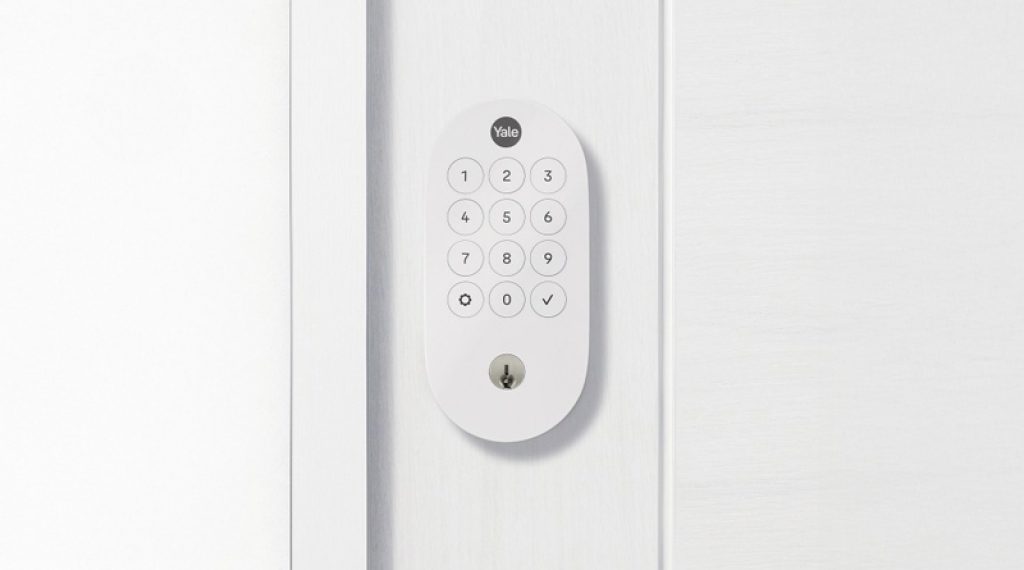
Yale has a long history in home security, with products ranging from safes to locks to delivery boxes. This experience helps make this lock design both familiar and reliable. Yale’s latest model is not especially compact like some other smart locks, but it is solid and easy to understand. The front features a straightforward keypad with backlit buttons and confirmation chimes, along with a traditional keyhole for backup access. The lock is rated at BHMA Grade 2, which is right in the middle of the lock security standard and suitable for all residential purposes.
Yale has skipped the bells and whistles such as fingerprint ID, face recognition, or NFC support for this lock. The outer section is relatively plain compared to more complicated locks, which keeps the cost down and simplifies the design. The inside unit consists of a deadbolt knob and a cover that hides the battery compartment, which takes four AA batteries that are included. The indoor cover is slightly flimsy compared to the rest of the construction, but that will not impact security much, although it could risk damage if something hits it directly.
Installation Process
Smart locks are among the more complicated home devices to install, but this version is easier to install than most locks on the market. The simple construction is backed by detailed written instructions as well as videos through Yale’s website, so you get plenty of guidance. Installation requires only a Philips screwdriver for any standard home door. By skipping the extras that some locks include, the setup is quick, which is one reason this model works well as a first time smart home device.
However, the extra open and close sensor is less impressive. This feature requires sticking an additional sensor nub to your doorframe so the lock can tell if the door has remained open. Unfortunately, these separate sensors do not fit on all door trim, are easy to accidentally knock off, and add an annoying installation step. More and more locks can sense open and close status without these add ons. However, this sensor is entirely optional, and you can ignore it unless sensing open doors is especially important to you. If you want to get alerts when an older relative leaves their door open, some people would appreciate this feature.
Google Home Integration And Smart Features
Behind the simple design of Yale’s new Matter smart lock are app features that indicate its usefulness and power. Since Yale’s lock is Google forward, setup with Google Home has major advantages for Google users. Google Home will recognize the lock with a QR code scan and set it up swiftly, with no need to input your Wi Fi login unless you have never used Google Home before. While the lock supports other Matter platforms such as Apple Home, it will only set up on one platform at a time. Google Home offers the fullest features, and alerts already pop up on your phone.
The lock and unlock screen is straightforward and includes a vacation mode that you can activate to disable the keypad entirely when you are away for long periods. Inside the settings, options expand. You can set the timer length of your auto locking capability, enable one touch unlocking and locking, and adjust what kind of notifications you get including battery alerts. If you do not like the chime sounds, you can lower the volume or turn them off completely.
Google Home also allows you to give ongoing access to certain people or create guest passcodes that can be used for a limited time. The current version of Google Home’s app is streamlined, speedy, and very easy to understand. It also means you can switch to other smart devices on Google Home or explore integrations with them and Yale’s lock, including compatibility with certain Nest products.
Voice Control And Security
Voice commands work well with the Yale lock. You can say “Hey Google, unlock my Yale lock,” and the system will ask for a code before unlocking. You can also type the code into a Nest touchscreen. This added feature helps prevent strangers from accessing your lock through the smart home, such as with potential AI prompt attacks. Asking “What is the status of my Yale lock?” also works if you are not sure whether the door is locked. Testing showed zero connection difficulties or dropped signals.
Yale’s lock is made to match the Google Nest Doorbell in style, but having a doorbell does not add any extra features to the lock, at least not yet. Yale has had specific Google Nest integrations in the past, such as being able to use facial recognition technology to automatically unlock with a previous version of an app. Similar features may come to this lock in the future.
Matter Compatibility And Platform Support
Matter is the unified smart home standard that allows devices to work across different ecosystems. The Yale Smart Lock with Matter supports Google Home, Apple Home, and Amazon Alexa. However, the lock will only set up on one platform at a time. If you want to switch from Google Home to Apple Home, you would need to reset the lock and set it up again. For Google fans, the features are fullest and most seamless within Google Home. For users of other platforms, the lock still works, but you may lose a tiny bit of functionality.
Pros And Cons
Pros
- Simplified design is sturdy and makes installation easier than most smart locks
- Matter compatibility with extra support for Google Home
- Affordable for a smart lock at under $150
- In depth settings including vacation mode, volume settings, and autolocking
- Guest passcodes can be created for limited time access
- Voice control works well with added code verification for security
- Installation instructions are great with both written guides and videos
- No Wi Fi login needed during setup if already using Google Home
- Zero connection difficulties or dropped signals during testing
- BHMA Grade 2 rating is suitable for all residential purposes
Cons
- Inside battery cover is slightly flimsy compared to the rest of the construction
- Door sensor add on is a pain to install, does not fit all door trim, and is easy to knock off
- No fingerprint access, face recognition, or NFC support
- Lock only sets up on one Matter platform at a time, no multi platform simultaneous use
- No special integrations with Nest Doorbell despite matching style
- Door sensor add on is optional but included, adding clutter for those who do not want it